
Accept payments online without a website
Create a payment link and share it via SMS, email, or WhatsApp. Accept cards, UPI, net banking, wallets, EMI, and more — no code required.
Payment Links
Pine Labs Online Pay by Link allows you to generate unique payment links that can be shared directly with your customers via email, SMS, or messaging apps. When customers click the link, they are redirected to a secure checkout page to complete the payment using multiple supported payment methods.
This feature is ideal for accepting digital payments without an online storefront, requesting payments remotely, or providing a seamless and flexible payment experience.
Create Payment Link via APIs Create Payment Link via DashboardLife Cycle
Learn about the different statuses of Pay by Link.
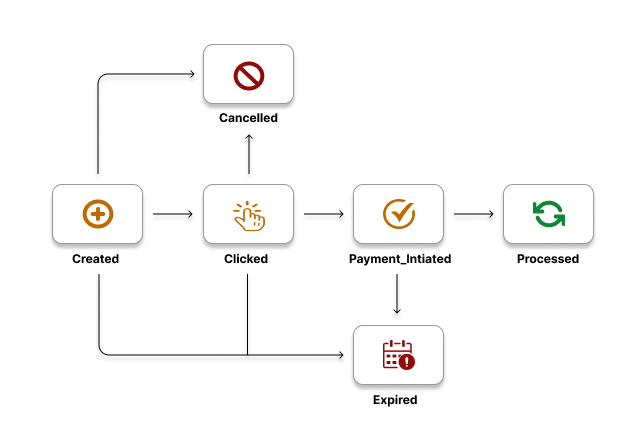
The table below list the various statuses that a Payment Link can have during its life cycle.
| Status | Description |
|---|---|
CREATED | When the create payment link request is successfully received by Pine Labs Online. The payment link has been created and shared with the customer. |
CLICKED | The customer has clicked on the link but hasn't initiated the payment yet. |
PAYMENT_INITIATED | When the Create Order request is successfully received by Pine Labs Online. The payment is initiated against an order. |
PROCESSED | The full payment has been successfully completed by the customer. |
CANCELLED | When the cancel payment link request is successfully received by Pine Labs Online. Indicates that you have cancelled the Payment Link. |
EXPIRED | When the current timestamp meets or exceeds the specified expiration timestamp for the payment link. The link has expired, and no payments can be accepted. |
Key Features
Customization Options
You can configure branding, payment methods, and expiry settings to create a personalized payment experience.
Real-time Tracking & Analytics
You can monitor payment link performance through dashboards with detailed insights on conversion rates, preferred payment methods, and overall transaction success.
Automated, Multi-Channel Link Sharing
Payment links are automatically sent via SMS or email, making it easy for customers to pay on their preferred platform.
Easy Integration
Integrate payment links easily with business systems via APIs, streamlining tracking and reporting processes.
Use Cases
Pay By Links provides flexible payment solutions that simplify transactions across various scenarios, offering businesses an efficient and customer-friendly way to accept payments. Here are some key use cases where Pine Labs Online Pay by Links can enhance payment experiences.
Retail and E-Commerce Sales
Retailers and online businesses can leverage Pine Labs Online Pay by Link to offer customers an easy way to pay for products directly via SMS or email links. For example, a clothing store can send payment links to customers after they select items on WhatsApp or other platforms, allowing the customer to pay securely without needing a website or app.
Healthcare Services and Appointments
Healthcare professionals or clinics can use Pine Labs Pay by Link to collect payments for consultations, treatments, or medical services. Patients can pay in advance for appointments or after services, simplifying the payment process in healthcare settings.
Educational and Training Fees
Schools, tutors, and training providers can send payment links to students or parents for course fees, exam fees, or materials. This simplifies payments for educational institutions and provides a convenient way for students and parents to pay without navigating complex portals.
Create and Manage Payment Links
Refer to our Payment Links Dashboard documentation to learn how to create, manage, track, and customize payment links directly from the merchant dashboard or via APIs.