
Accept Brand Wallet payments
Enable merchant-branded digital wallets to accept payments, issue refunds, credit cashbacks, and redeem gift cards — all within your customer ecosystem.
Brand Wallet is a Pine Labs-powered digital wallet built for your brand. It enables you to issue, store, and redeem wallet value directly within your own customer ecosystem. With Brand Wallet, customers can pay using wallet balance, receive refunds, earn cashbacks, add money, and redeem gift cards. This helps you to retain value within your ecosystem, improve repeat purchases, and offer a faster post-purchase experience.
Brand Wallet appears as a payment option on checkout, alongside cards, UPI, netbanking, and other supported payment methods.
Brand Wallets via Dashboard How Brand Wallet WorksWhy Use Brand Wallet?
Refunds and cashbacks are often credited back to your customer's bank account or original payment method. This can move money outside your ecosystem and reduce the chances of repeat purchases.
Brand Wallet helps merchants:
Retain money within your ecosystemOffer instant refunds and cashbacks
Increase customer lifetime value
Enable seamless wallet-based payments
Support promotional credits, gift cards, and loyalty-led use cases
Improve customer experience by reducing refund and cashback delays
Who can Use Brand Wallet?
Brand Wallet is ideal for businesses who want to drive repeat engagement and retain customer value within their ecosystem.
Recommended use cases include:
D2C brandsMarketplaces
Retailers with repeat customers
Subscription platforms
Loyalty-driven businesses
Gift card and promotional campaign-led businesses
Key Capabilities
Wallet as a Payment Method
Let's your customer to use Brand Wallet directly during checkout.
- Pay order amount using wallet balance.
- Split payments with wallet and other payment mode.
- Add money to the brand wallet and complete the payment.
This gives your customers more flexibility and helps you to drive wallet usage.
Instant Refunds and Cashbacks
Credit refunds, cashbacks, and promotional value directly into the customer's Brand Wallet.
- Refunds to wallet.
- Cashback and promotional credits.
- Real-time wallet balance updates.
Customers can reuse the balance instantly without waiting for bank settlement timelines.
Add Money and Balance Loads
Customers can add value to your Brand Wallet based on enabled use cases.
- Customers can add money using UPI, cards, or netbanking.
- You can load money through the Pine Labs dashboard for refunds, cashbacks, promotions, gift cards, and retention campaigns.
- Customers can also add money and complete payment in a single checkout flow, where enabled.
This helps retain wallet balance within your ecosystem for future purchases.
Gift Cards and Promotional Credits
Run digital gift card and promotional campaigns through Brand Wallet.
- Issue digital gift cards.
- Allow your customers to add gift cards to their wallet and redeem them at checkout.
- Configure campaign-level eligibility, duration, and conditions.
This keeps campaign redemption within the checkout experience.
Wallet Creation Options
Brand Wallet supports two wallet creation flows:
| Wallet Creation Method | Description |
|---|---|
| On-the-fly wallet creation | Wallet is created during checkout when the customer chooses to use Brand Wallet. |
| Bulk upload | You can create wallets in bulk and preload wallet balance for selected customers. |
Checkout Experience
Brand Wallet creates a seamless checkout experience by automatically fetching the customer’s wallet balance and showing it as a payment option. Customers can pay fully using their wallet, split the payment with another mode, or add money and complete the purchase in the same flow.
During checkout, customers can:
- View available wallet balance
- Add money to the wallet, if enabled
- Redeem wallet balance
- Apply gift cards
- Combine wallet balance with other payment methods
- Complete full or partial wallet payments
No separate customer app is required. Brand Wallet is available directly within the merchant’s checkout experience.
Integration Options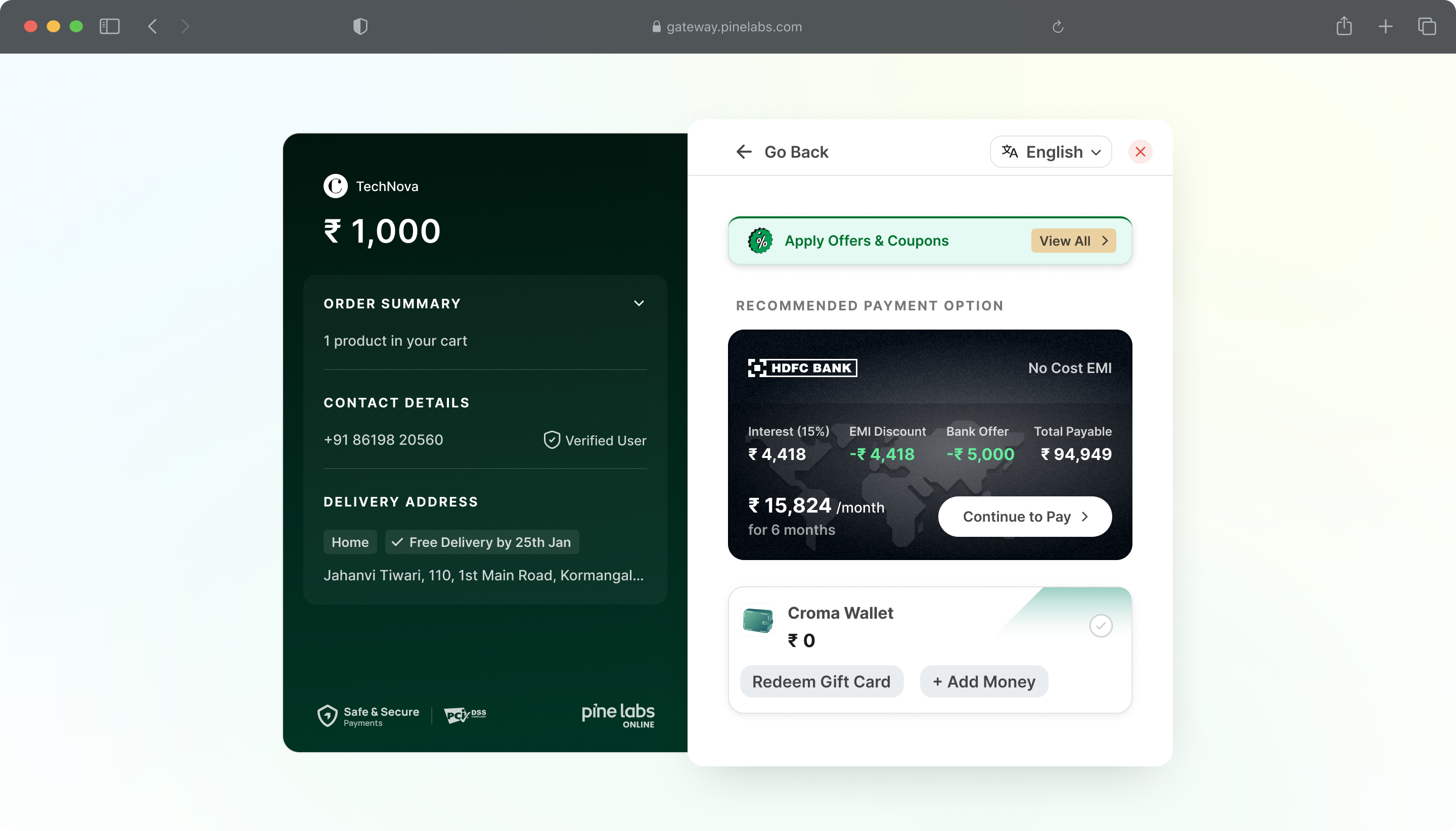
Settlements and Refunds
Brand Wallet supports wallet-related fund movement and reconciliation through Pine Labs Dashboard and APIs.
At a summary level:
- Wallet-related credits follow the configured settlement cycle, such as
T+1. - Money added through supported payment modes is settled on your account.
- Refunds and promotional credits can be posted to the customer’s wallet.
- Wallet redemptions use existing wallet balance and do not require fresh customer fund movement.
- Pine Labs handles wallet transaction reconciliation and reporting.
Settlement timelines and fund flow may depend on your configuration, enabled payment modes, and applicable operational rules.
Reports and Dashboard
You can track Brand Wallet activity from the Pine Labs dashboard.
Available reporting may include:
- Wallet transaction reports
- Wallet redemption details
- Refunds credited to wallet
- Cashback and promotional credit details
- Gift card issuance and usage
- Customer-level wallet history
Wallet transactions are visible alongside other payment modes in the Pine Labs dashboard.
Supported Wallet Actions
| Action | Supported |
|---|---|
| Create Wallet | ✅ |
| Add Money | ✅ |
| Full Wallet Payment | ✅ |
| Partial Wallet Payment | ✅ |
| Top-up and Pay | ✅ |
| Refund to Wallet | ✅ |
| Gift Card Addition | ✅ |
| Wallet Activate / Deactivate | ✅ |
Integration Options
You can enable Brand Wallet through supported Pine Labs integration options.
Available options include:
Pine Labs Dashboard
Start accepting payments via Pine Labs Online Dashboard using Payment Links and allow your customers to pay via Brand Wallets.
Hosted Checkout
Use Pine Labs Hosted Checkout — a hosted, one-page, offer-driven checkout experience. Redirect customers to a Pine Labs page or overlay to accept Brand Wallet payment.
Checkout SDKs
Use Pine Labs SDKs for web, mobile, and server integrations.
Custom Checkout
Build a fully branded payment experience. Collect payment details on your site and call Pine Labs APIs directly — full control over the checkout UX.
The integration method depends on the your checkout setup, wallet use case, and enablement configuration.
How Brand Wallet Works
Get started with Brand Wallet in minutes and start retaining refunds, cashbacks, gift card redemptions, and wallet payments within your own customer ecosystem.
Once Brand Wallet is enabled, your customers can use their wallet balance at checkout, while you can manage wallet creation, money loading, and refunds through the Pine Labs dashboard and APIs.
Get Started in 3 Steps
1. Enable Brand Wallet
Contact Pine Labs Sales to enable Brand Wallet for your account.
Contact Sales →Once enabled, Brand Wallet becomes available as a payment method on checkout. Wallet actions such as Create Wallet, Load Money, and Refund to Wallet also become available through the dashboard and APIs.
2. Send Wallet Identifier
Send your customer identifier details while creating an order so the customer wallet can be identified or created.
Supported identifiers:
| Identifier | Recommendation |
|---|---|
| Mobile Number | Mandatory |
| Email ID | Supported |
| External Customer ID | Merchant customer reference |
The wallet is mapped to the customer using the identifier shared in the create order request.
3. Accept Wallet Payments
Customers can use Brand Wallet at checkout once the wallet is available and the balance is fetched.
Customers can:
- Pay fully using wallet balance
- Split payment using wallet and other payment modes
- Redeem gift card balance, where applicable
End-to-End Flow
1. Brand Wallet is Enabled
Contact Pine Labs Sales and enables Brand Wallet for your account. Once enabled, Brand Wallet appears as a checkout payment method.
2. Customer Identifier is Shared
You have to send your customer’s mobile number, email ID, or external customer ID in the create order request. This helps Pine Labs identify the customer wallet during checkout.
3. Wallet is Created
A wallet can be created using the customer’s mobile number or email ID. Wallets may be created during checkout or through bulk upload from the dashboard.
Brand Wallet supports two wallet creation flows:
| Wallet Creation Method | Description |
|---|---|
| On-the-fly wallet creation | Wallet is created during checkout when the customer chooses to use Brand Wallet. |
| Bulk upload | You can create wallets in bulk and may preload wallet balance for selected customers. |
You can use Pine Labs Brand Wallets APIs to create and manage Wallets.
4. Wallet is Loaded
Wallet balance can be added through refunds, cashbacks, gift cards, promo loads, or customer-added top-ups. You can load wallet balances using the dashboard or APIs.
Brand Wallet supports two ways to load money into a customer’s wallet as listed below:
| Load Money Method | Description |
|---|---|
| On-the-fly load money | Wallet is load during checkout when the customer chooses to use Brand Wallet. |
| Bulk upload | You can preload wallet balance for your customers in bulk. |
You can use Pine Labs Brand Wallets APIs to load money and manage Wallets.
5. Wallet Appears at Checkout
The customer’s wallet balance is auto-fetched and displayed at checkout. Brand Wallet appears as a payment option alongside other payment methods such as cards and UPI.
6. Customer Pays and You Get Settled
Customers can pay fully using wallet balance, split the payment with another payment mode, or redeem gift card balance. You receive settlements as per the T+1 cycle, with reconciliation handled by Pine Labs.