
Accept Apple Pay payments
Enable eligible merchants to accept Apple Pay payments from customers in India across supported Apple devices and browsers.
Pine Labs Online enables eligible merchants to accept Apple Pay payments from customers in India, providing a fast, secure, and seamless checkout experience on supported Apple devices.
Customers can use eligible cards added to Apple Wallet to make payments in INR through supported Pine Labs Online checkout experiences.
Apple Pay for domestic payments
Apple Pay is a secure digital payment method that enables customers to pay using eligible cards stored in Apple Wallet. Customers authenticate payments using Face ID, Touch ID, or device passcode, depending on the supported device.
With Pine Labs Online, merchants can offer Apple Pay as an additional payment option alongside existing payment methods.
For integration and implementation details, use the Apple Pay resources linked in this page based on your checkout model.
Integration Steps Apple Pay SDKAdvantages
Higher conversion rates
Provides a simplified and seamless payment experience, helping reduce checkout abandonment.
Reduced friction
Eliminates the need for customers to manually enter card details during checkout.
Faster checkout
Enables customers to authenticate and complete payments quickly using Face ID, Touch ID, or device authentication.
Increased security
Protects payment credentials through tokenization and secure device-based authentication, reducing exposure of sensitive card information.
Device compatibility
Apple Pay is displayed to customers when they are using a supported device and browser and have an eligible payment card configured in Apple Wallet.
| Device Type | Supported Models |
|---|---|
| iPhone | Devices with Touch ID, except iPhone 5s, or Face ID. |
| iPad | iPad Pro, iPad Air, iPad, and iPad mini models with Touch ID or Face ID. |
| Apple Watch | Series 1 and later. |
| Mac | Mac with Touch ID or Mac paired with an eligible Apple device. |
| Browsers | Safari and supported third-party browsers on compatible devices. |
Device and browser support can change based on Apple's current platform requirements. Refer to Apple's compatibility documentation for the latest supported-device list.
Customer visibility
Apple Pay is displayed as an available payment option only when the customer meets the required eligibility conditions:
- Compatible device and browser: The customer is using a supported Apple device and browser.
- Eligible card: The customer has an eligible payment card added to Apple Wallet.
- Apple Pay availability: Apple Pay is available for the customer's device, region, and payment configuration.
If the customer does not meet these conditions, Apple Pay is not displayed as a payment option.
Currently, only Visa and Mastercard card networks are supported.
Apple Pay branding
Display the Apple Pay brand mark in the payment methods section of your website to indicate support before checkout.
Follow Apple's official marketing guidelines for correct usage of the brand mark.
Apple Pay checkout interface
Pine Labs Online provides an optimized Apple Pay checkout experience across supported web and mobile environments.
Mobile checkout
The mobile checkout experience is optimized for smaller screens and provides a streamlined Apple Pay payment flow with the Apple Pay button prominently displayed.
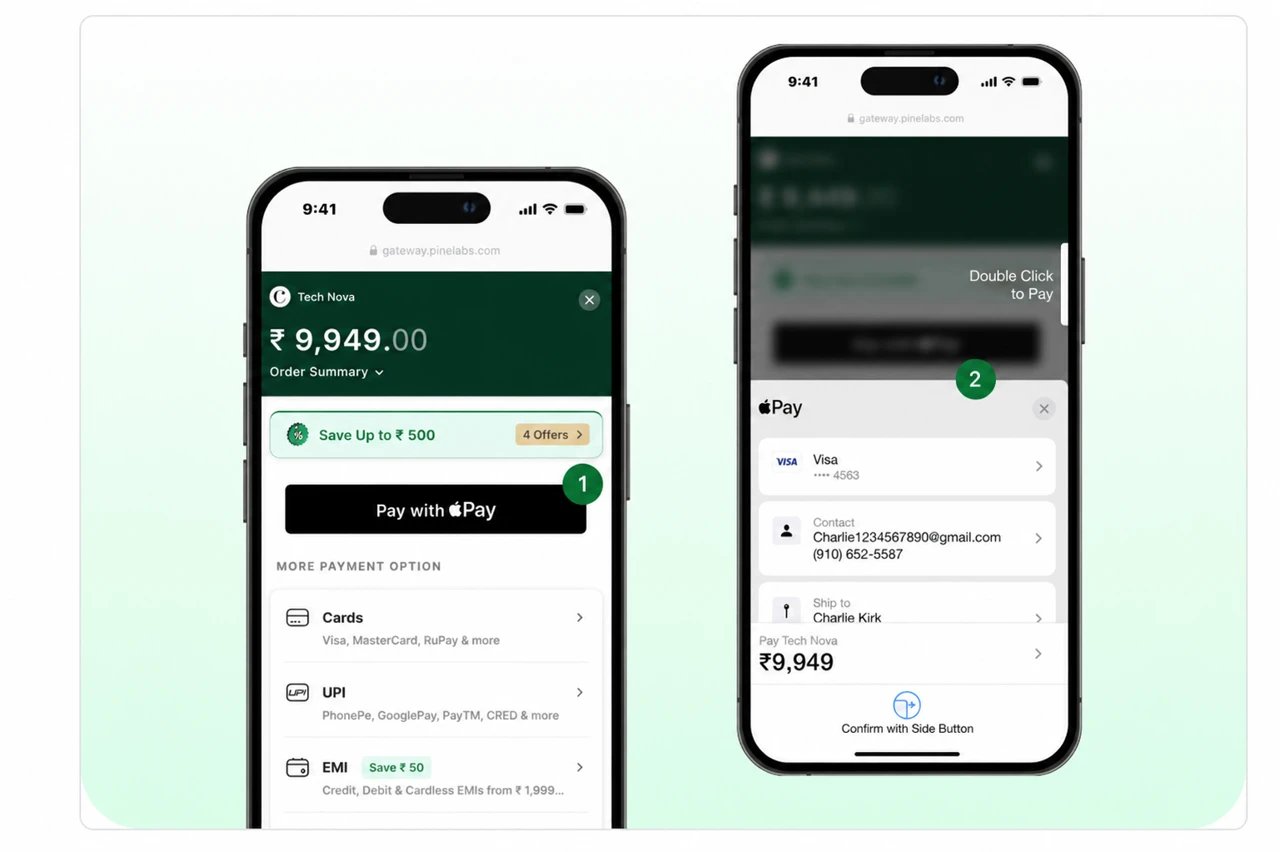
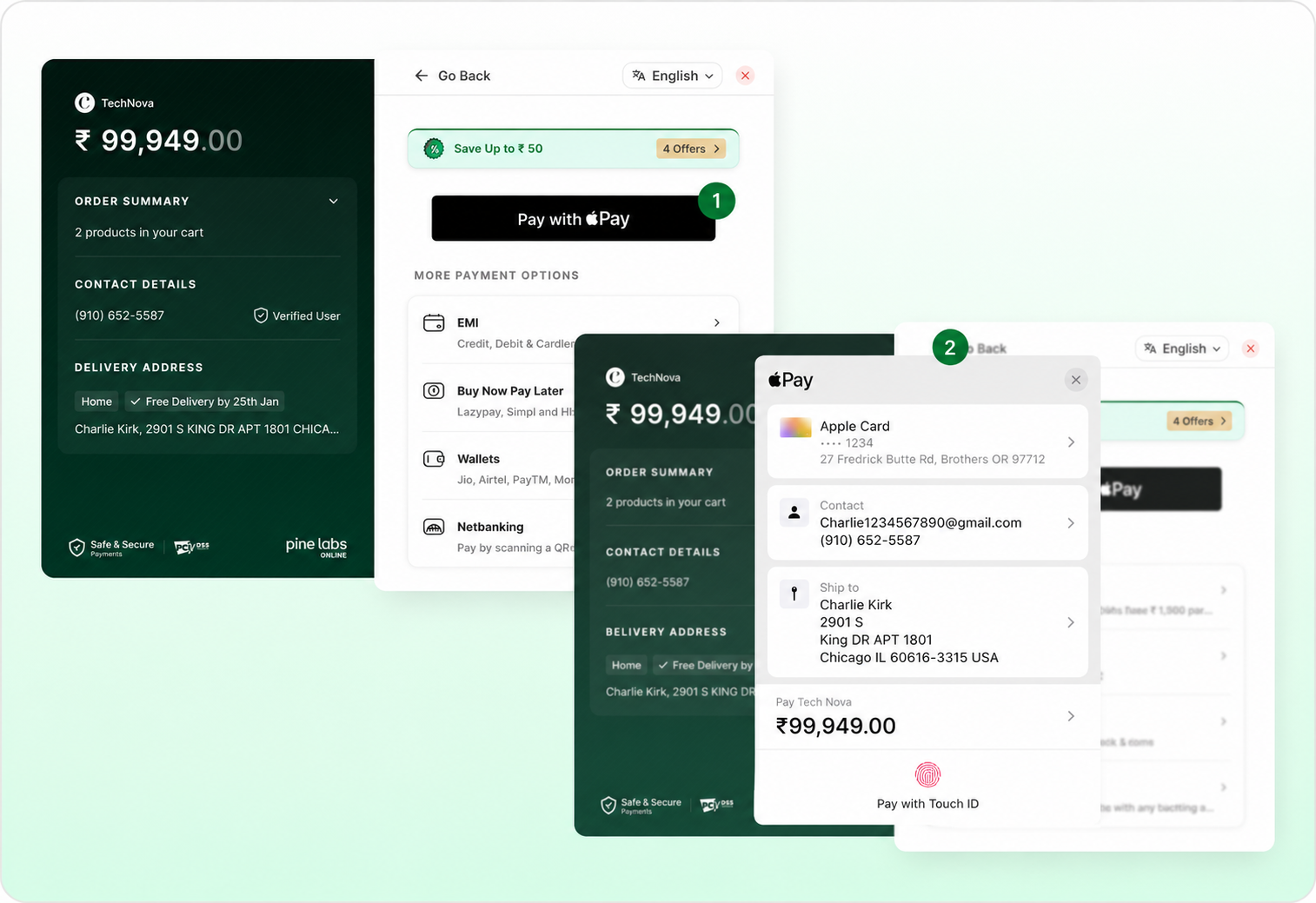
Web checkout
The web checkout experience is optimized for desktop screens and provides a seamless Apple Pay payment flow through supported browsers.
The Apple Pay button should be displayed according to Apple's user interface and branding requirements.
Supported implementations
Pine Labs Online offers multiple implementation paths for Apple Pay depending on your checkout architecture.
Apple Pay SDKs
Integrate Apple Pay for web and mobile applications using Pine Labs Online SDKs and platform-specific implementation guidance.
Token Decryption
Securely decrypt and process the Apple Pay payment token received after the customer authenticates a transaction.
Integration Steps
Follow the end-to-end steps to configure Apple Pay, initiate checkout, handle authorization, and process the payment response.
Apple Pay is supported on Payment Links as well, subject to your enabled Pine Labs Online configuration.