
Payments
Accept payments via cards, UPI, net banking, wallets, EMI, BNPL, and reward points using Pine Labs Online Payment APIs.
Overview
Learn how you can use Pine Labs Online Payments to accept payments from your customers.
Payments refer to the transfer of money from one person to another person, in exchange for goods and services. Online payments are an essential aspect of commerce, ensuring that businesses receive compensation for their offerings and customers can complete the payments conveniently and securely.
To use Pine Labs Online Payment APIs as a prerequisite you are required to create an order.
Using Pine Labs Online Payment APIs you can accept payments using the below methods.
cards,upi,walletsnetbankingemipay laterpay by pointsandinternational payments
Pine Labs Online Payments APIs can be used for the following actions.
In the create payment API response we return the challenge_url you need to use this URL to navigate your users to the checkout page.
Life Cycle
Learn about the different statuses acquired during the checkout flow for our Payments.
The figure below shows the life cycle of an Payments.
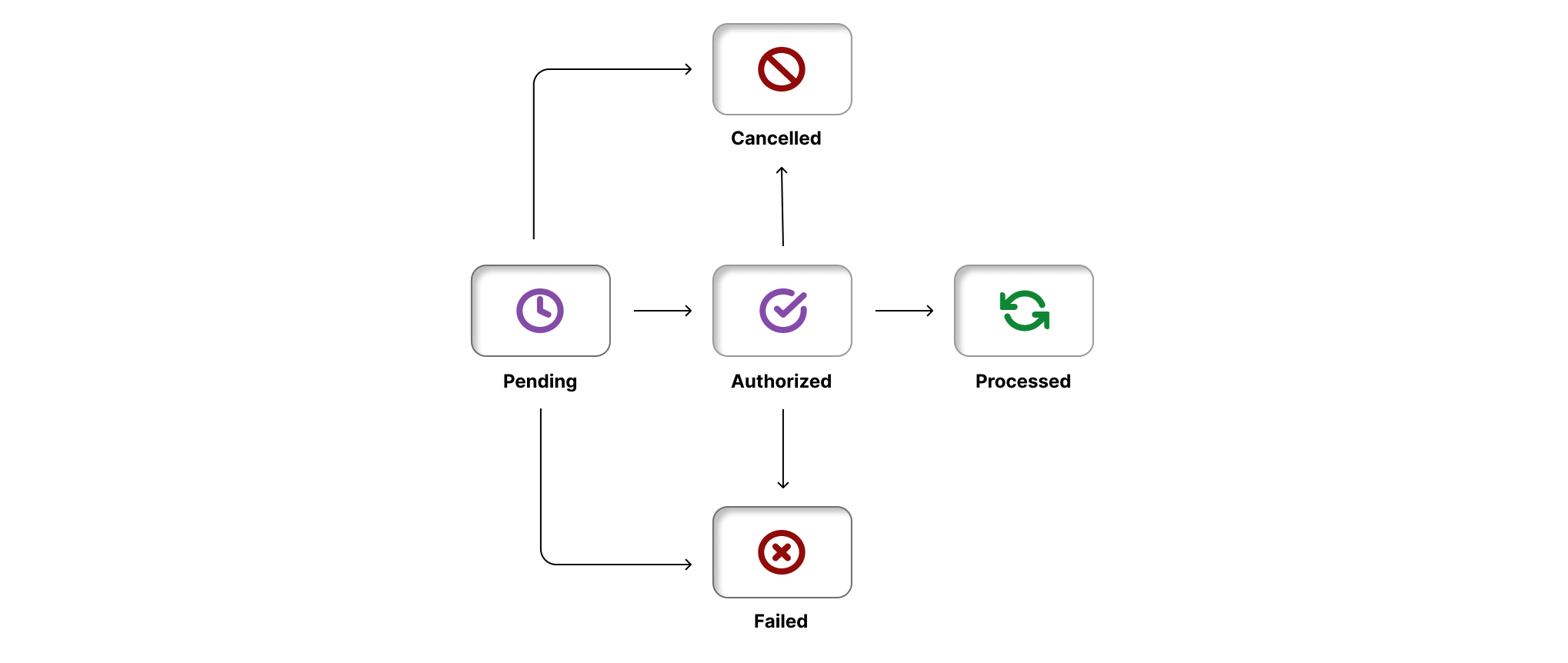
The table below list the various statuses that our Payments can have during its life cycle.
| Status | Description |
|---|---|
PENDING | When the create payment request is successfully received by Pine Labs Online. |
AUTHORIZED | Only when pre_auth is true. When the payment is received successfully. The money is credited from the payer account and waiting for the partner authorization to credit to the partner bank account. |
PROCESSED | When the payment is received successfully. The money is debited from the payer account and credited to the partner bank account successfully. |
CANCELLED | When the payment get cancelled. Note: When pre_auth is set to true.The partner can cancel the payment if there is a failure in delivering the product or service. Similarly, the customer also has the option to cancel the payment during the checkout process. |
FAILED | When the payment fails, this can be for many reasons such as maximum retries for OTP verification, partner downtime etc. |
Late Authorization Flow
The flow diagram below illustrates the late authorization process.
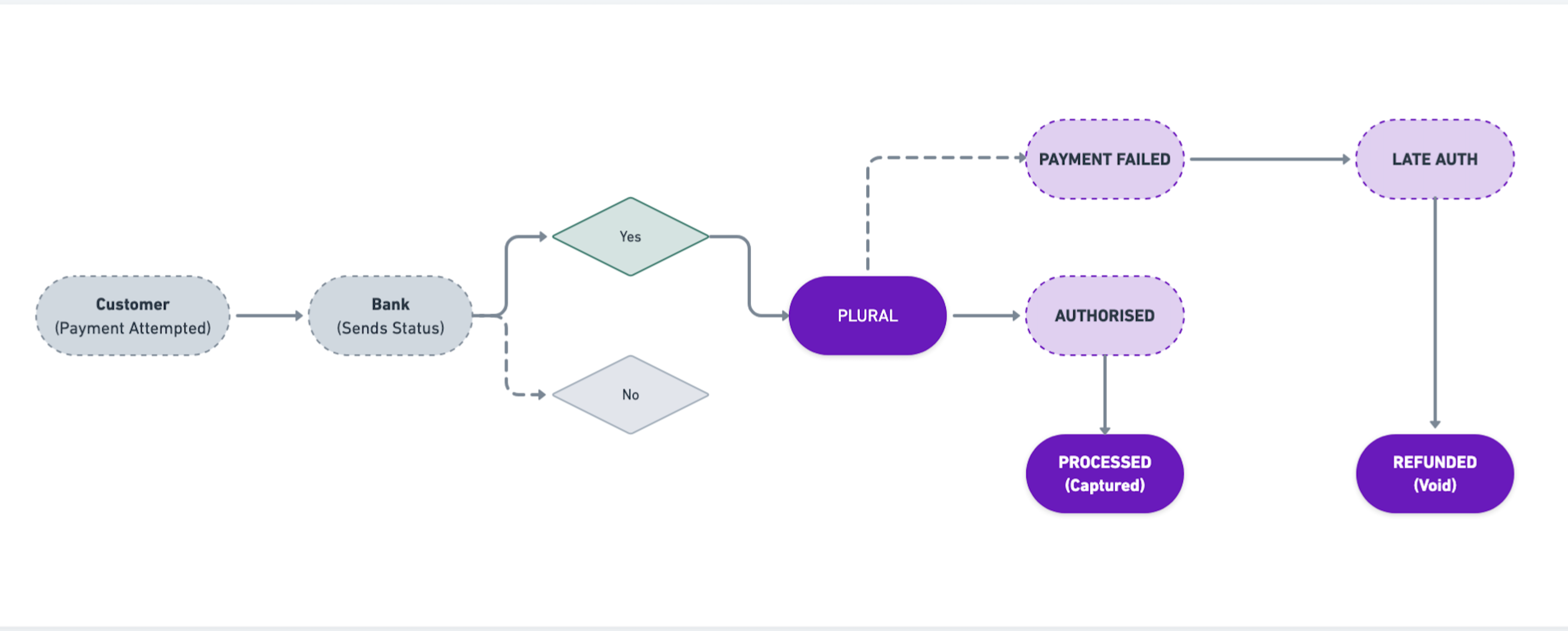
For example consider a merchant who has set the late authorization time to 10 seconds. Here's how the payment status typically unfolds:
- Payment Initiation: The customer completes the payment and the payment status is in a
pendingstate. If the bank's gateway doesn't return a response to Pine Labs Online within the configured time, the payment status is marked as "failed." - Pine Labs Online Validation: If no response is received from the bank within the 10-second window, Pine Labs Online automatically updates the payment status to "Failed" due to timeout.
- Refund: We initiate refunds for late authorised payments.
📘 Note:
Customers can retry to make a new payment against the order.
Key Features:
- Configurable Timeout: You can configure the late authorization timeout based on your specific needs and the payment modes you use.
For example, if a merchant expects a terminal status within 10 minutes for a particular payment mode, Pine Labs Online system will automatically handle the transaction if it exceeds that threshold. - Automatic Reversal: If a transaction eventually succeeds after the timeout, Pine Labs Online ensures that the customer receives an automatic reversal if necessary, ensuring customer satisfaction.
- Resource Optimisation: By enforcing a late authorization timeout, Pine Labs Online prevents merchants from repeatedly querying the transaction status, which can consume system resources and affect overall performance.
Default Handling
For merchants who have not enabled the late authorization configuration, Pine Labs Online provides a default solution to prevent system overload:
- Mode-wise Default Timeout: Pine Labs Online implements a default timeout of 5 hours. This ensures that even for merchants without late authorization configuration, transactions will be reversed appropriately after a default period.
- Transaction Failure Post Timeout: After the default timeout expires, Pine Labs Online marks the transaction as failed. This allows the merchant to stop querying the transaction status unnecessarily.
Integrating with Pine Labs Online payments, you can rest assured that Pine Labs Online handles all transactions, even those stuck in a non-terminal state, ensuring timely resolution through either a terminal success or an automatic failure.