
Orders
Use Pine Labs Online Orders API to create orders, manage pre-authorization, capture or cancel payments, and track order statuses through the payment lifecycle.
Order is a prerequisite step of the payment lifecycle at Pine Labs Online. An order contains the total amount and the purchase details against an order. For every order, we generate a unique order ID. It ensures that each order can be identified, referenced, and accessed without confusion or ambiguity. This order_id must be used in our payments API to accept payment against an order.
Integrate our Orders API on your backend servers before initiating a payment. Our orders also support Pre-authorization as an option.
Pre Authorization
In our orders API, we provide pre-authorization as an option. With pre-authorization set to true, you can capture or cancel a payment for an order.
When pre-auth is set to true, and the payment is successfully created, you have the following options:
- Capture Order: Utilize the Pine Labs Online capture order API in your backend to capture the payment against an order. You can only capture an order when the order status is
authorized. - Cancel Order: Use the Pine Labs Online cancel order API in your backend to cancel the payment against an order. You can only cancel an order when the order status is
authorized.
Pine Labs Online orders APIs can be used to create an order and retrieve the details of an order.
📘 Note:
- Currently, Pre-authorization is supported only for Cards and PayByPoints.
Life Cycle
Learn about the different statuses acquired during the checkout flow for our Orders.
Pre-authorization is True
The figure below shows the life cycle of an Order when the Pre-authorization is set to true.
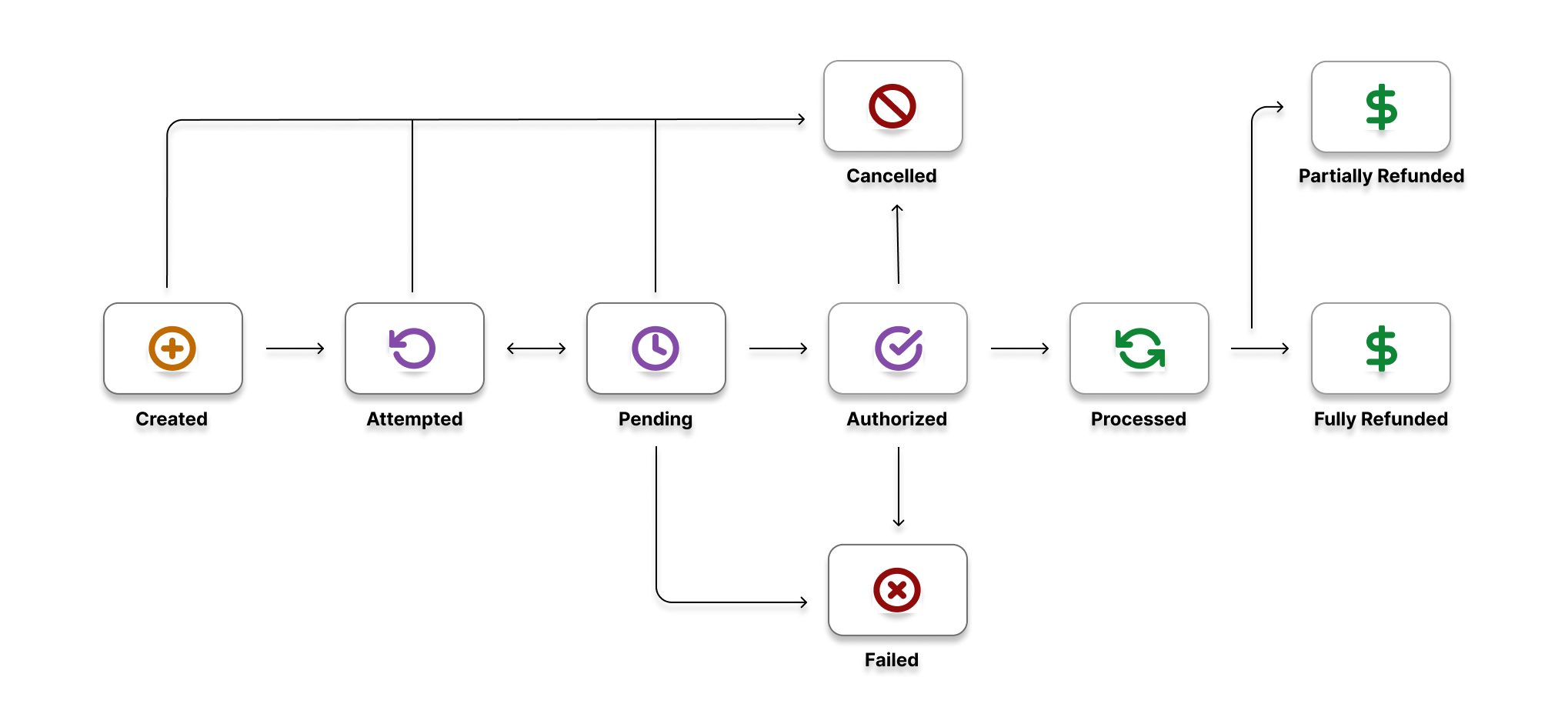
The table below list the various statuses that our Orders can have during its life cycle.
| Status | Description |
|---|---|
CREATED | When the Create Order request is successfully received by Pine Labs Online. |
ATTEMPTED | When the payment on a pending order fails, order acquire this status. A payment retry can be done from this order status. |
PENDING | When the order is linked against a payment request. Note: To link a payment use the order_id generated in our Create Payment API and create a payment request. This successfully links your payment against the order. |
AUTHORIZED | When the payment is received successfully. The money is blocked by the issuer at payer account and waiting for the partner authorization to credit to the partner bank account or customer account. Note: When pre-authorization is enabled, you have the option to either capture or cancel a payment settlement to your account. Capture Order: Integrate with our Capture Order API to complete the payment for an order. For instance, you can secure the payment once the product or service has been successfully provided to the purchaser. Subsequently, the funds are transferred to the partner’s bank account. Cancel Order: Utilize the Cancel Order API to revoke the payment for an order. For example, if the product or service fails to reach the buyer, you can annul the payment. The refunded amount will then be credited back to the customer’s account. |
PROCESSED | When the payment is received successfully. The money is debited from the payer account and credited to the partner bank account successfully. |
CANCELLED | When the payment is cancelled using our Cancel Order API. |
FAILED | Payment acceptance failed for reasons such as maximum retries for OTP verification etc. |
FULLY_REFUNDED | When the payment is completely refunded. The money is debited from the partner bank account and credited to the customer's bank account. |
PARTIALLY_REFUNDED | When the partial refund is successful. The money is debited from the partner bank account and credited to the customer's bank account. |
Pre-authorization is False
The figure below shows the life cycle of an Order when the Pre-authorization is set to false.
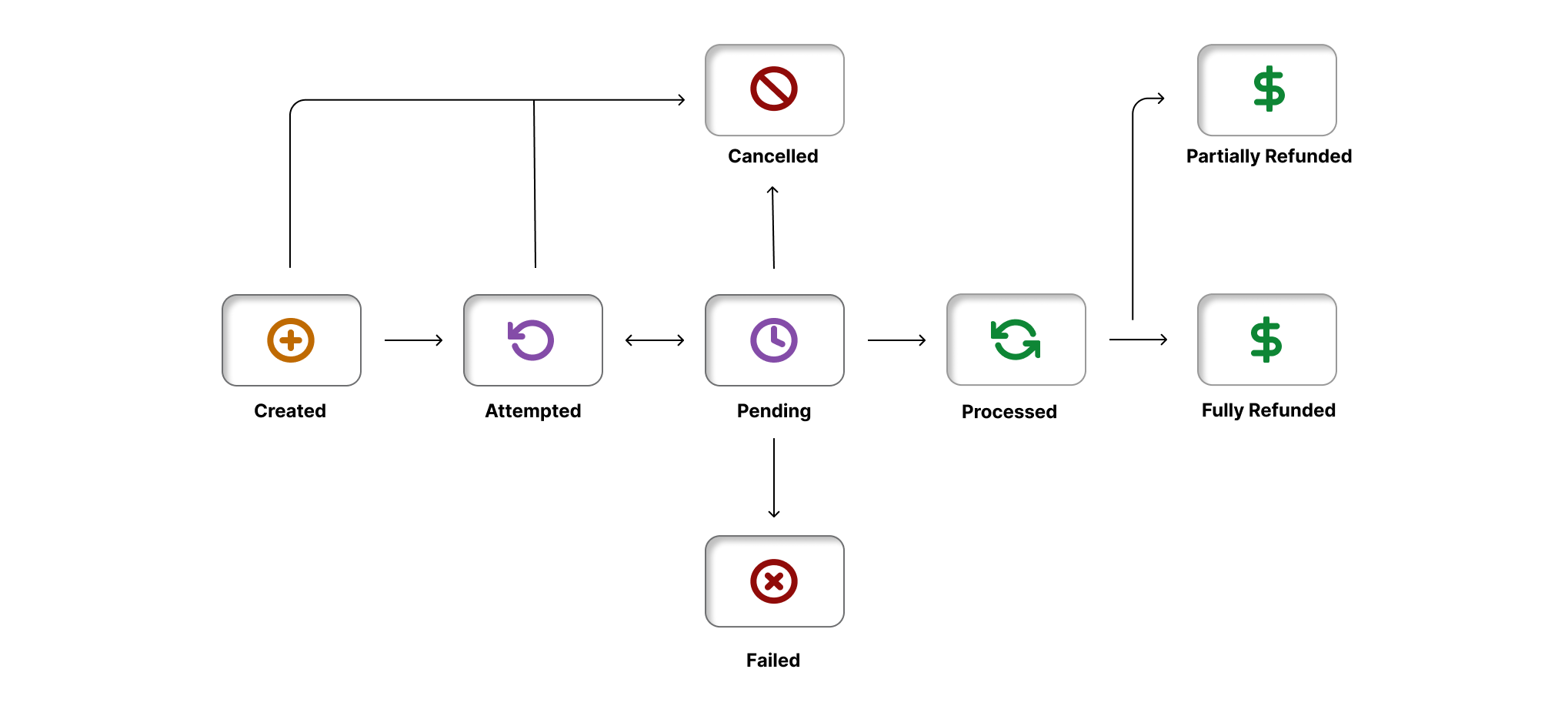
The table below list the various statuses that our Orders can have during its life cycle.
| Status | Description |
|---|---|
CREATED | When the Create Order request is successfully received by Pine Labs Online. |
ATTEMPTED | When the payment on a pending order fails, order acquire this status. A payment retry can be done from this order status. |
PENDING | When the order is linked against a payment request. Note: To link a payment use the order_id generated in our Create Payment API and create a payment request. This successfully links your payment against the order. |
PROCESSED | When the payment is received successfully. The money is debited from the payer account and credited to the partner bank account successfully. |
CANCELLED | When the payment is cancelled using our Cancel Order API. |
FAILED | Payment acceptance failed for reasons such as maximum retries for OTP verification etc. |
FULLY_REFUNDED | When the payment is completely refunded. The money is debited from the partner bank account and credited to the customer's bank account. |
PARTIALLY_REFUNDED | When the partial refund is successful. The money is debited from the partner bank account and credited to the customer's bank account. |
Manage Orders
Pine Labs Online APIs provide the below-listed actions to manage your orders.
1. Manage Orders when pre-auth is true.
- Capture Order: Use this API to capture the payment against an order. You can use this API only when the order status is
authorized. - Cancel Order: Use this API to cancel the payment against an order. You can use this API only when the order status is
authorized. - Get Order by Order ID: Use this API to retrieve the specific order using the
order_id. - Get Order by Merchant Reference ID: Use this API to retrieve the specific order using the
merchant_order_reference_id.
2. Manage Orders when pre-auth is false
- Get Order by Order ID: Use this API to retrieve the specific order using the
order_id. - Get Order by Merchant Order Reference ID: Use this API to retrieve the specific order using the
merchant_oder_reference_id.
1. Capture Order
Use this API to capture the payment against an order. You can use this API only when the order status is authorized.
Use the below endpoint to capture the payment against an order.
PUT: https://pluraluat.v2.pinepg.in/api/pay/v1/orders/{order_id}/capture
Shown below is a sample request and sample response for a Capture Order API.
{
  "merchant_capture_reference": "merchant-capture-ref-r4y",
  "capture_amount": {
    "value": 1100,
    "currency": "INR"
  }
}
Refer to our Capture Order API documentation for more information.
2. Cancel Order
Use this API to cancel the payment against an order. You can use this API only when the order status is authorized.
Use the below endpoint to cancel the payment against an order.
PUT: https://pluraluat.v2.pinepg.in/api/pay/v1/orders/{order_id}/cancel
Shown below is a sample response for a Cancel Order API.
{
  "data": {
    "order_id": "v1-5757575757-aa-hU1rUd",
    "merchant_order_reference": "2177120b-3be1-4330-a15f-53ce14d19841",
    "type": "CHARGE",
    "status": "CANCELLED",
    "merchant_id": "123456",
    "order_amount": {
      "value": 50000,
      "currency": "INR"
    },
    "pre_auth": true,
    "purchase_details": {
      "customer": {
        "email_id": "kevin.bob@example.com",
        "first_name": "Kevin",
        "last_name": "Bob",
        "customer_id": "232323",
        "mobile_number": "9876543210",
        "billing_address": {
          "address1": "H.No 15, Sector 17",
          "address2": "",
          "address3": "",
          "pincode": "61232112",
          "city": "CHANDIGARH",
          "state": "PUNJAB",
          "country": "INDIA"
        },
        "shipping_address": {
          "address1": "H.No 15, Sector 17",
          "address2": "",
          "address3": "",
          "pincode": "144001123",
          "city": "CHANDIGARH",
          "state": "PUNJAB",
          "country": "INDIA"
        }
      },
      "merchant_metadata": {
        "key1": "DD",
        "key2": "XOF"
      }
    },
    "payments": [
      {
        "id": "v1-2711071924-aa-VxIzq1-cc-Z",
        "status": "CANCELLED",
        "payment_amount": {
          "value": 1100,
          "currency": "INR"
        },
        "payment_method": "CARD",
        "payment_option": {
          "card_data": {
            "card_type": "CREDIT",
            "network_name": "VISA",
            "issuer_name": "NONE",
            "card_category": "CONSUMER",
            "country_code": "IND",
            "token_txn_type": "ALT_TOKEN"
          }
        },
        "acquirer_data": {
          "approval_code": "000000",
          "acquirer_reference": "202456644249243",
          "rrn": "420123000239"
        },
        "created_at": "2024-07-19T11:27:55.664Z",
        "updated_at": "2024-07-19T11:28:52.487Z"
      }
    ],
    "created_at": "2024-07-19T11:27:55.664Z",
    "updated_at": "2024-07-19T11:28:52.487Z"
  }
}
Refer to our Cancel Order API documentation for more information.
3. Get Order by Order ID
Use this API to retrieve the order by order ID.
Use the below endpoint to retrieve the order.
GET: https://pluraluat.v2.pinepg.in/api/pay/v1/orders/{order_id}
Shown below is a sample response for a Get Order by Order ID API.
{
  "data": {
    "order_id": "v1-5757575757-aa-hU1rUd",
    "merchant_order_reference": "2177120b-3be1-4330-a15f-53ce14d19841",
    "type": "CHARGE",
    "status": "CANCELLED",
    "merchant_id": "123456",
    "order_amount": {
      "value": 50000,
      "currency": "INR"
    },
    "pre_auth": true,
    "purchase_details": {
      "customer": {
        "email_id": "kevin.bob@example.com",
        "first_name": "Kevin",
        "last_name": "Bob",
        "customer_id": "232323",
        "mobile_number": "9876543210",
        "billing_address": {
          "address1": "H.No 15, Sector 17",
          "address2": "",
          "address3": "",
          "pincode": "61232112",
          "city": "CHANDIGARH",
          "state": "PUNJAB",
          "country": "INDIA"
        },
        "shipping_address": {
          "address1": "H.No 15, Sector 17",
          "address2": "",
          "address3": "",
          "pincode": "144001123",
          "city": "CHANDIGARH",
          "state": "PUNJAB",
          "country": "INDIA"
        }
      },
      "merchant_metadata": {
        "key1": "DD",
        "key2": "XOF"
      }
    },
    "payments": [
      {
        "id": "v1-2711071924-aa-VxIzq1-cc-Z",
        "status": "CANCELLED",
        "payment_amount": {
          "value": 1100,
          "currency": "INR"
        },
        "payment_method": "CARD",
        "payment_option": {
          "card_data": {
            "card_type": "CREDIT",
            "network_name": "VISA",
            "issuer_name": "NONE",
            "card_category": "CONSUMER",
            "country_code": "IND",
            "token_txn_type": "ALT_TOKEN"
          }
        },
        "acquirer_data": {
          "approval_code": "000000",
          "acquirer_reference": "202456644249243",
          "rrn": "420123000239"
        },
        "created_at": "2024-07-19T11:27:55.664Z",
        "updated_at": "2024-07-19T11:28:52.487Z"
      }
    ],
    "created_at": "2024-07-19T11:27:55.664Z",
    "updated_at": "2024-07-19T11:28:52.487Z"
  }
}
Refer to our Get Order by Order ID API documentation for more information.
4. Get Order by Merchant Order Reference
Use this API to retrieve the order by merchant order reference.
Use the below endpoint to retrieve the order by merchant order reference.
GET: https://pluraluat.v2.pinepg.in/api/pay/v1/orders/reference/{merchant_order_reference}
Shown below is a sample response for a Get Order by Merchant Order Reference API.
{
  "data": {
    "order_id": "v1-4405071524-aa-qlAtAf",
    "merchant_order_reference": "112345",
    "type": "CHARGE",
    "status": "CREATED",
    "merchant_id": "104359",
    "order_amount": {
      "value": 1100,
      "currency": "INR"
    },
    "pre_auth": false,
    "purchase_details": {
      "customer": {
        "email_id": "kevin.bob@example.com",
        "first_name": "Kevin",
        "last_name": "Bob",
        "customer_id": "123456",
        "mobile_number": "9876543210",
        "billing_address": {
          "address1": "10 Downing Street Westminster London",
          "address2": "Oxford Street Westminster London",
          "address3": "Baker Street Westminster London",
          "pincode": "51524036",
          "city": "Westminster",
          "state": "Westminster",
          "country": "London"
        },
        "shipping_address": {
          "address1": "10 Downing Street Westminster London",
          "address2": "Oxford Street Westminster London",
          "address3": "Baker Street Westminster London",
          "pincode": "51524036",
          "city": "Westminster",
          "state": "Westminster",
          "country": "London"
        }
      },
      "merchant_metadata": {
        "key1": "DD",
        "key2": "XOF"
      }
    },
    "payments": [],
    "created_at": "2024-07-15T05:44:51.174Z",
    "updated_at": "2024-07-15T05:44:51.174Z"
  }
}
Refer to our Get Order by Merchant Order Reference ID API documentation for more information