
Customization Option
Use Pine Labs Seamless Checkout to build a fully branded payment experience. Collect payment details on your site and call Pine Labs APIs directly — full control over the checkout UX.
Overview
The Customization area in the Pine Labs Online dashboard allows administrators to manage merchant-level controls from one place. Use this area to configure payout access, subscription transaction access, merchant integration keys, payment link amount limits, and Express Checkout settings.
The Customization page is available under Settings for the selected merchant. The dashboard header shows the selected merchant context, the Customizations section, and a shortcut back to All Merchants.
Customization dashboard overview
Customization tab overview with payout, subscription, and payment link amount controls.
- Accessing Customization Settings
- Open the Payment Gateway dashboard.
- Select the required merchant.
- Go to Settings.
- Select the Customization tab.
The Settings page includes the following tabs:
| Tab | Purpose |
|---|---|
| Credentials | Manage credential-related setup. |
| Webhook | Configure webhook details. |
| Checkout Styling | Manage checkout appearance. |
| Express Checkout | Configure checkout experience controls and preview customer-facing checkout screens. |
| Customization | Manage payout, merchant integration, subscription, and payment link amount controls. |
| Payment Modes | Configure available payment methods. |
Customization Tab
The Customization tab contains operational controls that affect merchant-level features.
From this tab, administrators can:
- Enable or disable the payout module.
- Manage current accounts for payout workflows.
- Configure merchant integration keys.
- Copy JWT token generation keys and values.
- Enable or disable subscription transactions.
- Set the maximum allowed payment link amount.
Checkout Styling
The Checkout Styling tab allows you to customise the appearance of the Pine Labs hosted checkout page.
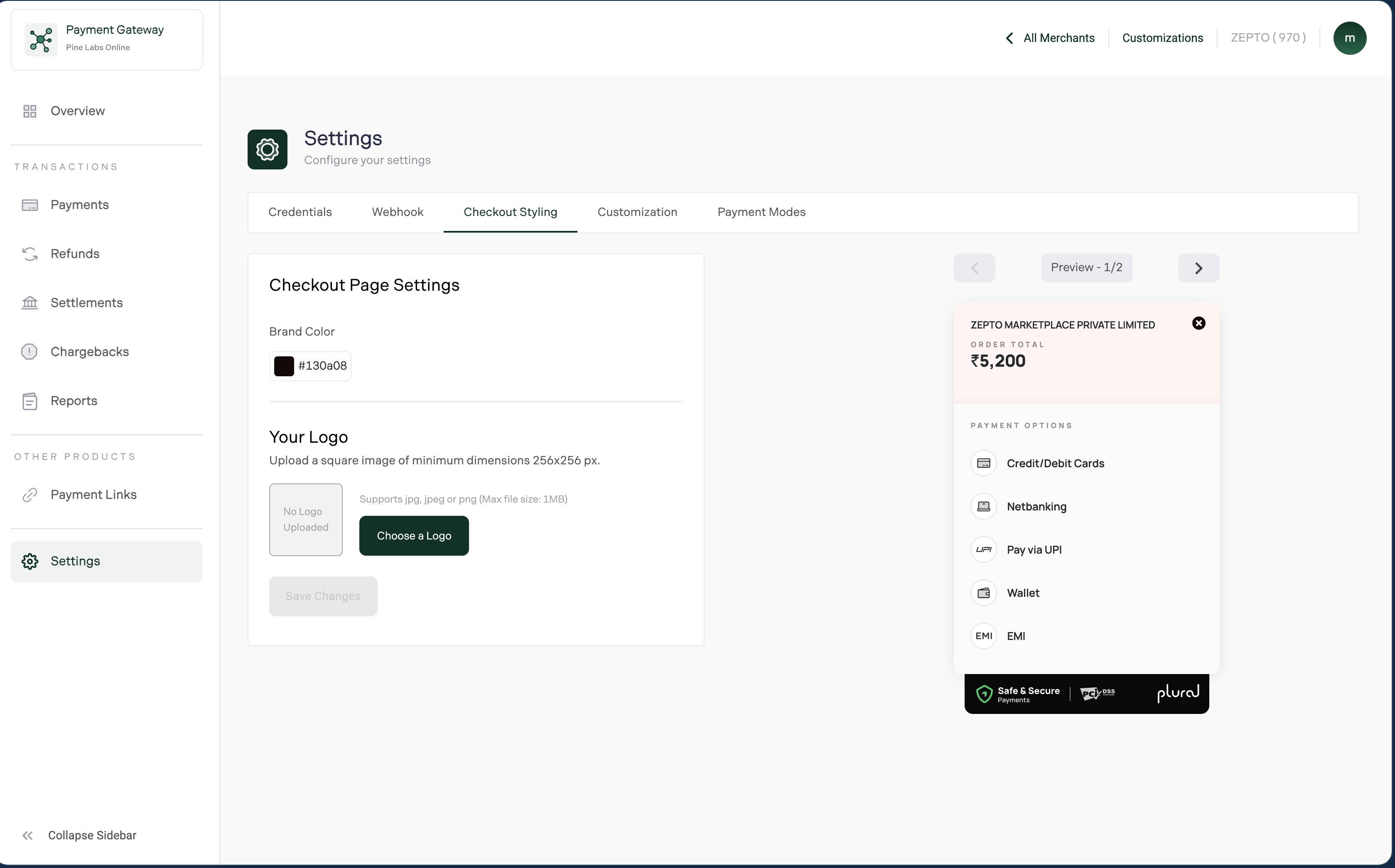
Branding Options
| Element | Details |
|---|---|
| Brand Color | Hex color used for checkout highlights and headers |
| Logo Upload | JPG, JPEG, or PNG image up to 1 MB |
Live Checkout Preview
The dashboard includes a live preview panel that updates instantly when:
- Brand colors are changed
- Logos are uploaded
- Checkout states are previewed
This helps ensure branding consistency before publishing changes.
Checkout Branding Best Practices
- Use the same logo across your website and checkout
- Match checkout colors with your brand identity
- Maintain consistent business naming
- Keep branding clean to improve customer trust and reduce payment drop-offs