
Accept EMI Payments
Enable Credit Card EMI, Debit Card EMI, and Down Payment EMI with a single integration using the Pine Labs Online Affordability Suite.
Accept EMI Payments with Pine Labs Online Affordability Suite
Enable customers to pay in easy monthly instalments (EMIs) by integrating the Pine Labs Online Affordability Suite with your website or mobile application. With a single integration, you can offer Credit Card EMI, Debit Card EMI, and Down Payment EMI options from leading banks, helping customers make high-value purchases more affordable.
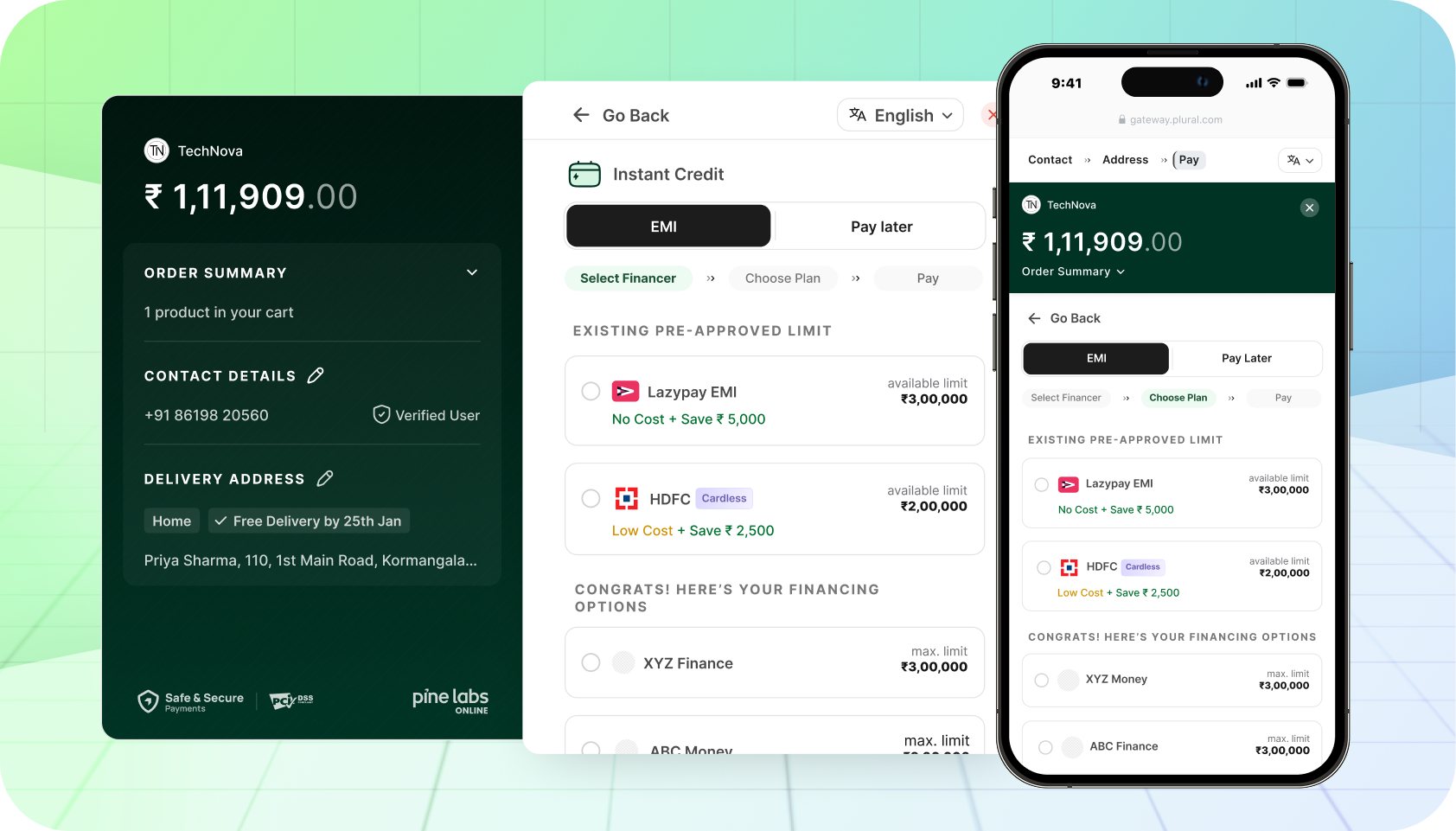
EMI Payment Options
Pine Labs Online Affordability Suite offers flexible payment options by enabling the following EMI solutions.
Credit Card EMI
Customers can convert credit card transactions into monthly installments. Supports Bank EMI and Brand EMI with options for No Cost, Low Cost, and Standard EMI plans.
Integrate Credit Card EMI →Debit Card EMI
Pre-approved customers can convert debit card transactions into monthly installments. Available with HDFC and ICICI debit card EMI options.
Integrate Debit Card EMI →Down Payment EMI
Split a high-value transaction into an upfront down payment and remaining EMI installments, making expensive purchases more accessible to customers.
Integrate Down Payments EMI →How It Works
- Offer Discovery: Use the Offer Discovery API to check available EMI offers and calculate installment amounts for the customer's card.
- Offer Validation: Validate the selected EMI offer using the Offer Validation API before proceeding with the payment.
- Create Order: Create an order with the appropriate payment method (
CREDIT_EMIorDEBIT_EMI) in theallowed_payment_methodsarray. - Create Payment: Submit the payment with the selected EMI tenure, offer details, and card information.
- Handle Payment: Redirect the customer to the
challenge_urlfor authentication, then verify the payment signature on callback. - Get Order Status: Confirm the final order status using the Get Order by Order ID API.
Supported EMI Types
| EMI Type | Payment Method | Description |
|---|---|---|
| Bank EMI | CREDIT_EMI / DEBIT_EMI | Standard EMI offered by the issuing bank with applicable interest rates |
| Brand EMI | CREDIT_EMI / DEBIT_EMI | EMI with brand subventions offering No Cost or Low Cost EMI to customers |
| Split EMI | CREDIT_EMI | EMI with split payment options (e.g., iPhone for Life) where a percentage is paid upfront |
| Down Payment EMI | CREDIT_EMI / DEBIT_EMI | Partial upfront payment with remaining amount converted to EMI |
Key Advantages
Increased Affordability
Customers can split high-value purchases into manageable monthly installments starting from 3 to 24 months, making expensive products accessible.
Multiple EMI Options
Offer No Cost EMI, Low Cost EMI, and Standard EMI plans across multiple banks and card networks to maximize customer choice.
Higher Conversions
Reduce cart abandonment by enabling customers to pay in installments. EMI options drive larger order values and improve checkout completion rates.
Brand Subventions
Leverage brand partnerships to offer No Cost EMI where brands absorb the interest, making purchases even more attractive to customers.
Integration Benefits
Full Payment Upfront
You receive the full transaction amount immediately from the bank. EMI collections are handled entirely by the issuing bank.
Seamless Integration
Single API integration supports all EMI types — Credit, Debit, and Down Payment EMI — with consistent request and response formats.
Pre-Authorization Support
Supports pre-authorization flows for both Credit and Debit EMI, allowing you to capture or cancel orders after successful delivery.
Wide Bank Coverage
Supports EMI from all major banks including HDFC, ICICI, SBI, Axis, and more with automatic offer discovery and validation.